




Sortable leaderboards rank wallets by win rate, lifetime profit and loss, and recent percentage gains, so you can spot who’s actually winning rather than just who’s loud on social media.
Polymarket Analytics Review 2026: How This Free Tool Stacks Up


 Polymarket Analytics is a free, browser-based data platform built specifically for Polymarket traders who want more than the basic market view. No wallet connection is required just to browse leaderboards and market data, though you’ll need to connect one to track your own portfolio or trade directly inside the platform. This Polymarket Analytics review breaks down what it does well, where it falls short, and whether it should earn a spot in your daily trading routine.
1
Polymarket
1
Polymarket
$25 Bonus On First Deposit
Deposit $10, Get a $25 Trading Bonus
Live Trade with the Biggest Payouts at the Largest Prediction Market in the World
Quick Verdict on Polymarket Analytics
Polymarket Analytics is a Polymarket-focused analytics dashboard that ranks wallets by profit and win rate, then lets you dig into any trader’s full history before deciding whether to follow their prediction market positions. The single best reason to use it: the trader leaderboard and wallet profile system are genuinely deep, pulling on-chain data across every wallet that’s ever touched Polymarket, which is hard to replicate manually. The biggest limitation is that it’s built almost entirely around Polymarket, so if you split your action between Kalshi and Polymarket, you’ll only get partial value here. Our take: if you trade Polymarket regularly and want to research or copy successful wallets, Polymarket Analytics is worth having open daily. If you’re a casual odds-checker or you need equal coverage across Kalshi, look elsewhere.
Polymarket Analytics at a Glance
| Feature | Detail |
|---|---|
| Category | Analytics & Dashboards |
| Platforms Supported | Polymarket (primary), with limited Polymarket vs. Kalshi price comparison in market search |
| Pricing | Free tier, plus a $20/month premium plan |
| Free Tier / Trial | Yes, free tier available, no free trial of premium confirmed |
| Account or Wallet Access Required | None to browse; wallet connection required for portfolio tracking and in-platform trading |
| Setup Time | Under 2 minutes to browse; wallet connect takes about a minute if you want portfolio tracking |
| API Access | Yes, paid Falcon API, sold separately from the platform subscription |
What Is Polymarket Analytics?
Polymarket Analytics is a data platform built for active Polymarket traders who want more visibility than the standard Polymarket interface gives you. It’s one of several Polymarket analytics tools on the market, but it stands out for the depth of its wallet-level data. The platform indexes on-chain records across every trade, wallet, and position on Polymarket, then organizes all of it into searchable trader profiles, leaderboards, and market pages.
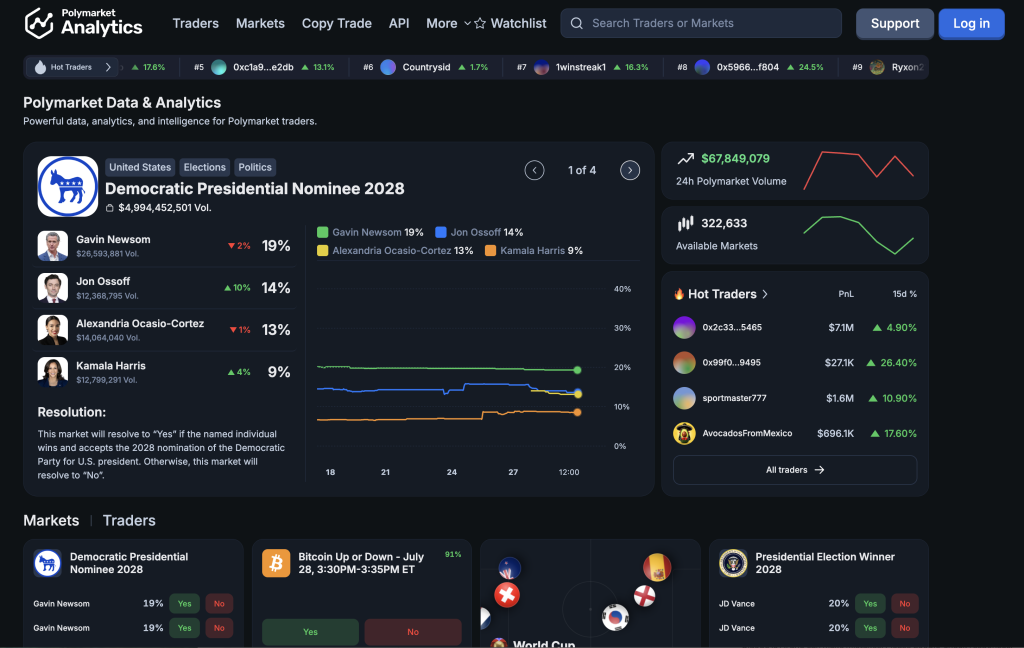
It was originally built by data engineer Primo Data with direct backing from Polymarket itself, and it now carries a track record that includes coverage from outlets like the Wall Street Journal and CoinDesk. The platform was later acquired by PolyGun, which is worth knowing since it means future feature priorities could shift under new ownership. The core problem it solves is simple: instead of manually digging through blockchain explorers to figure out who’s actually winning on Polymarket, you get ranked, filterable data in a few clicks.
Key Features of Polymarket Analytics
Polymarket Analytics packs a handful of features that matter most to anyone doing serious wallet research or market discovery on Polymarket:
Trader Performance Tables
Advanced Wallet Filters
Narrow thousands of wallets down by win rate thresholds, open position size, and portfolio value, which speeds up the process of finding a copy-trade target instead of scrolling profile by profile.
Deep Trader Profiles
Every wallet page shows lifetime performance, resolved trades, open interest, and timing patterns. A newer “trader streaks” feature flags wallets currently on a hot run.
Market Discovery Pages
Live 24-hour volume across every active Polymarket contract, with keyword search and historical volume context, plus a Polymarket vs. Kalshi price comparison view for spotting gaps between the two venues.
Portfolio Tracking and In-Platform Trading
Connect one or more wallets to combine profit, positions, and performance in a single view. A more recent update also added the ability to place trades directly from inside the platform.
API Access
The Falcon API lets developers and power users build automated alerts or custom scripts on top of the same data, sold as a separate paid product from the core dashboard.

Tip:
This last point doubles as the "how it works" mechanic worth understanding: the platform reads public on-chain Polymarket data, ranks it, and hands you a target list of wallets worth watching or copying. It never touches your funds unless you specifically connect a wallet and choose to trade.
Supported Platforms and Markets on Polymarket Analytics
| Platform | Supported | Market Categories Covered | Notes |
|---|---|---|---|
| Polymarket | ✅ Yes | All active Polymarket contracts across politics, sports, crypto, and culture | Primary focus of the platform |
| Kalshi | ⚠️ Partial | Price comparison only, within market search | No dedicated Kalshi leaderboards or wallet tracking |
If you’re specifically after Kalshi trader data, this isn’t the tool for it. Polymarket Analytics gives you a genuinely deep Polymarket data layer, and the Kalshi angle exists mainly so you can spot pricing gaps between the two venues, not as a standalone Kalshi research tool.
Polymarket Analytics Pricing
Polymarket Analytics pricing is straightforward and transparent, which isn’t always a given in this space:
- Free tier: Core analytics access, including leaderboards, wallet filters, and market discovery, is free. The limitation is a cap on saved favorites and saved views.
- Premium plan ($20/month): Removes those caps, increases data refresh priority, expands portfolio tracking, and grants early access to new features.
- Trading fees: The platform itself charges no trading fees. If you trade directly through it, you’re still subject to the underlying Polymarket fee schedule.
- API add-on: The Falcon API is priced and sold separately from the core subscription, so budget for that if you’re building automated tools on top of the data.
For most casual-to-moderate users, the free tier covers real research work. The $20/month premium plan mainly makes sense if you’re hitting the saved favorites cap or want faster data refresh for active trading.
Getting Started with Polymarket Analytics
Getting up and running takes just a couple of minutes if you only want to browse, longer if you want portfolio tracking or in-platform trading:
1
Visit polymarketanalytics.com.
No download or signup is required to start browsing leaderboards and market data.
2
Browse ranked wallets.
Open the Traders section and sort by profit, win rate, or recent gains, then apply category filters for politics, crypto, or sports specialists.
3
Review trader profiles.
Click into any wallet to see lifetime profit, open positions, and closed trades before deciding whether to follow it.
4
Search markets.
Use the Markets tab to find specific events and compare Polymarket and Kalshi pricing side by side.
5
Connect a wallet (optional).
If you want your own portfolio tracked, or want to trade directly inside the platform, connect your wallet at this step. This is the only point where the platform requests wallet access, and it’s used for viewing your positions and, if you choose, executing trades.
6
Save favorites.
Mark traders and markets you check often for faster access on return visits, with higher limits on the paid plan.
Tip:
The total signup time is under two minutes for basic browsing, closer to five if you're connecting a wallet and setting up a portfolio view.
Is Polymarket Analytics Legit and Safe to Use?
Yes, based on everything publicly verifiable, Polymarket Analytics is legit and safe to use. The team behind it isn’t anonymous. It was built by data engineer Primo Data with direct support from Polymarket, giving it a level of accountability many smaller prediction market tools don’t have. The platform has also been active and updating consistently, with recent additions like trader streaks, an API product, and in-platform trading rolled out over time rather than a one-and-done launch.
On the access side, connecting a wallet is optional and only required if you want portfolio tracking or want to trade directly through the platform. Outside of that, Polymarket Analytics reads public blockchain data and never asks for private keys, seed phrases, or deposits to use its core research features.
The one thing worth flagging: the platform was acquired by PolyGun after its initial launch, which means feature priorities and support could shift under new ownership over time. That’s not a red flag on its own, but it’s worth watching if you come to rely on this tool daily. As with any prediction market tool, weigh this alongside how Bonus.com evaluates prediction market tools before making it part of your regular workflow.
Pros and Cons of Polymarket Analytics
Pros
- Ranks every Polymarket wallet by lifetime profit, win rate, and recent returns, with genuinely deep on-chain data behind it.
- Category filters surface specialists in politics, crypto, or sports instead of just high-volume generalists.
- Market search compares Polymarket and Kalshi prices side by side for spotting gaps.
- Core analytics stay free, with a clearly priced $20/month tier if you outgrow it.
- Never asks for private keys or deposits to use the core research features.
- Backed by a track record that includes coverage from outlets like the Wall Street Journal and CoinDesk.
Cons
- Coverage is heavily weighted toward Polymarket, so Kalshi-focused traders get limited value.
- No built-in price alerts, so you'll need to check back manually or use a separate alerting tool.
- Free tier caps saved favorites and saved views, which active users will hit quickly.
- Feature priorities may shift following the PolyGun acquisition, which is worth watching over time.
Who Is Polymarket Analytics For?
👍 Use it if you're:
- A regular Polymarket trader who wants to research or copy wallets with a proven track record instead of guessing.
- Someone who wants a free, no-signup way to browse market volume and trending Polymarket events.
- A developer or analyst who wants API access to build custom alerts or scripts on top of Polymarket data.
⚠️ Look elsewhere if you're:
- Primarily a Kalshi trader looking for the same depth of wallet and leaderboard data on that platform.
- Someone who wants built-in price alerts without adding a separate tool.
- A casual bettor who checks odds occasionally and doesn’t need wallet-level research.
Polymarket Analytics Alternatives
Polymarket Analytics isn’t the only option if you want deeper visibility into Kalshi and Polymarket activity. Here’s how it stacks up against a few other prediction market tools worth knowing about.
| Tool | Category | Platforms | Pricing | Best For |
|---|---|---|---|---|
| Kalshinomics | Analytics & Dashboards | Kalshi | Free | A cleaner, faster interface for Kalshi market data |
| Hashdive | Analytics & Dashboards | Polymarket + Kalshi | Free Tier; Pro Tier ($29/month) | Smart-money and whale tracking across both platforms |
| Polywhaler | Analytics & Dashboards | Polymarket + Kalshi | Not publicly confirmed — verify before publishing | Whale trade tracking with insider-pattern scoring |
| Stand.Trade | Aggregators & Terminals | Polymarket + Kalshi | Free | Trading both platforms from a single terminal |
Breakdown of Alternatives to Polymarket Analytics
- Kalshinomics is the pick if you split your trading toward Kalshi and want an equally clean, purpose-built dashboard on that side, though it doesn’t cover Polymarket at all.
- Hashdive covers both Polymarket and Kalshi under one roof, using a proprietary Smart Score to rate wallets from -100 to 100, which trades some of Polymarket Analytics’ Polymarket-specific depth for cross-platform reach.
- Polywhaler narrows in specifically on large trades of $10,000 or more, with a scoring system built to flag potential insider activity rather than a general leaderboard, so it’s worth a look if whale-specific signal matters more to you than broad trader research.
- Stand.Trade is the option if what you actually want is a single terminal for trading both platforms directly, rather than a research dashboard sitting alongside your regular trading flow.
Final Verdict
Polymarket Analytics does one thing very well: it turns raw, public Polymarket blockchain data into ranked, searchable trader profiles that would otherwise take real manual digging to piece together. What holds it back is scope. It’s built for Polymarket first, with Kalshi treated as an afterthought, and it doesn’t offer built-in alerts if that’s a workflow you rely on. If you trade Polymarket regularly and want a free, legitimate way to research wallets and spot volume before it moves, Polymarket Analytics earns a place in your daily rotation. If your trading is split evenly across Kalshi and Polymarket, or you check odds only occasionally, you likely won’t miss much by skipping it.
Polymarket Analytics FAQs
Yes. Polymarket Analytics was built with direct support from Polymarket by data engineer Primo Data, and it’s been cited by outlets including the Wall Street Journal and CoinDesk. It reads only public on-chain data and doesn’t require private keys or deposits to use its core features.
Yes, the core platform is free to use, including leaderboards, wallet filters, and market discovery. A $20/month premium tier removes limits on saved favorites and saved views and adds faster data refresh and expanded portfolio tracking.
No, not to browse. You only need to connect a wallet if you want to track your own portfolio or trade directly inside the platform. Browsing leaderboards, trader profiles, and market data requires no wallet at all.
Not equally. Polymarket Analytics is built primarily for Polymarket, with a Polymarket vs. Kalshi price comparison feature inside market search. It doesn’t offer dedicated Kalshi leaderboards or wallet tracking the way it does for Polymarket.
For regular Polymarket traders who want to research or copy successful wallets, yes. The free tier alone covers solid research work, and the $20/month plan is reasonably priced if you outgrow the caps. It’s less worth it if you split your trading between Kalshi and Polymarket equally.
Yes. The Falcon API is available as a separate paid product for developers who want to build automated alerts or scripts on top of the platform’s data.


