




Webull Review October 2026: Options, Stocks, and Prediction Markets



Quick Take:
I’ve tried Webull and found it to be a great option for experienced traders who dip their toes into prediction markets. This brokerage platform offers highly customizable desktop and mobile apps for users who want to trade stocks, ETFs, futures, options, and, more recently, regulated prediction markets through its partnership with Kalshi.
In this Webull review, I’ll cover everything you need to know: how it works, fees, markets, pricing, safety, and promotions. If you’re wondering “is Webull legit?”, know that Webull’s prediction market options are facilitated under Webull Futures LLC, which is a Futures Commission Merchant registered with the CFTC.


Best Sites Like Webull This Month
Compare Webull with our list of the best prediction markets to help you make an informed choice.
Get $100 in Predicts Bonus When You Trade $1 for 5 Days
Make Predictions on Real World Events Right in Your Phone
Trade on Sports to Culture, Financials, Crypto and More
Trade on Sports, Politics, and MORE
Largest Prediction Market in the US
Hundreds of Markets to Choose From
Huge Range of CFTC-Approved Markets (Sports, Tech, and More)
Compete with Others & Climb the Leaderboards
No User Limiting on Trades
Deposit $10, Get a $25 Trading Bonus
Live Trade with the Biggest Payouts at the Largest Prediction Market in the World
America's #1 Sports Prediction Market
Same Sports Moments, Bigger Payouts
Choose from Straights, Player Props, Parlays & More
Webull at a Glance
| Regulatory Status | CFTC-registered Futures Commission Merchant |
|---|---|
| Platform Type | CFTC-regulated event contracts broker (via Kalshi) |
| Available Markets | Index Markets, Crypto, Fed Events, Sports |
| Trading Fee | $0.02 per contract (50% commission + 50% exchange fee) |
| Minimum Trade | No minimum |
| Payment Methods | Debit card, ACH, wire transfer |
| US Availability | Available in all 50 states, some contracts may be restricted |
| Mobile App | iOS and Android apps available |
| Current Promotion | Deposit $500+ and get $20 of fractional shares + 1 month of Webull Premium |
| Trust Score | 5 out of 5 |
Pros & Cons of Webull
Pros
- Trades happen through Kalshi, the first CFTC-regulated exchange
- No minimum balance is required to trade
- You’ll accrue interest if your Event Trade account is linked to a Cash account
- Margin trading may be available for Event Contracts
- The desktop app is fully customizable
- Hourly markets available for stocks and crypto predictions
Cons
- You need at least 2 separate accounts to trade prediction markets
- Fees will add up quickly at $0.02 per contract
- Lack of information available for non-registered users
- Prediction markets aren’t available on the web app
- The desktop app only offers index and crypto hourly contracts
- Usability may be challenging for beginners
Platform Overview: What Is Webull?
Webull is a multi-asset trading platform that combines traditional investment products with prediction markets, and to do so, it operates through two different entities:
- Webull Financials LLC: a broker-dealer registered with the SEC that operates traditional investment products, like stocks, ETFs, and options.
- Webull Futures LLC: a CFTC-registered Futures Commission Merchant that provides access to Kalshi’s event contracts for prediction markets.
Because of the way Webull works, you’ll have to first register a brokerage account and then request an additional Webull Futures account to trade prediction markets.
This is also the main differentiator between Webull and other prediction market platforms: you can access a long list of investment and trading products all within the same platform. The trade-off is the slightly longer registration process and complex app structure.
Markets Available on Webull
At the time of our review, Webull offers the following prediction markets:
Sports
This is the platform’s most comprehensive category, and you’ll find plenty of event contract options:
- Single-game contracts: winner, spread, total points, player props
- Futures contracts: Championship or season-long outcomes, season awards, and tournament winners
- Combo contracts: You can combine multiple outcomes into one single contract.
The sports market is open 24/7, and event resolution depends on the contract (e.g., a single-game contract resolves at the end of the match, while a season-long contract closes at the end of the season).
We believe this is the best category for those who want to move from sports betting to prediction market trading, as it shares many of the same questions and will provide a smoother transition before diving into the index or crypto categories.
Index Markets
You can also predict market movements with the S&P 500 and NASDAQ Hourlies. The platform’s contracts include questions like:
- Will the S&P 500 be above/below 6,500 at 2 PM?
- Will the Nasdaq 100 be above/below 30,300 at 2 PM?
As the name suggests, these event contracts last only one hour, and trading hours run from 8 AM to 4 PM EST.
Webull’s platform offers numerous tools and charts to help you predict the market’s movements, which is definitely a plus. However, unlike the sports prediction markets, we’d recommend this and the next categories to traders with a bit more expertise in assessing stock and index markets.
Crypto Hourlies
One of the most recent additions to Webull’s prediction markets is the crypto hourlies, where you can predict the hourly price movements of Bitcoin, Ethereum, Ripple, and Solana.
The contract questions are the same for all cryptocurrencies: will the price of this cryptocurrency be above or below X amount within the hour?
As happens with the Index Market Hourlies, each contract lasts 60 minutes, and you can either hold your position or sell it before the one-hour time runs out. Trading hours run from 8 AM to 6 PM EST.
For each market, you also have access to a chart, events list, and related news to help you make your predictions with as much information as possible.
Fed Events
For those who want to predict macroeconomic events, you can also place your predictions on the Federal Reserve decisions. Some examples of predictions you can make include:
- Fed decision in June?
- Number of rate cuts in 2026?
- Fed funds rate in June?
- Will the Fed Funds rate change in June 2026?
Unlike what happens with the other economic market categories, here you give your predictions for year-long events, specifically the number of rate cuts.
The trading hours for this category run from 8 AM to 11 PM EST, and contacts are issued on a six-week recurring basis. There are also some future event contracts available that correspond to the eight-yearly meetings held by the Federal Open Market Committee.
How Trading Works on Webull
Trading event contracts on Webull is simple, but navigating the app’s interface might be tricky if you’re not used to trading platforms. There are also some platform-specific rules you must follow before making your first order, like requesting an event contract account through an existing individual cash or margin account.
Once Webull approves your event contract account, you can browse the “Events” tab on the desktop or mobile app. We recommend using the mobile app as it’s the only interface where you can access all available market categories.
The next step is simple: pick whether you want to buy a “Yes” or “No” position depending on the question asked. Contract prices range between $0.01 and $0.99 and will always pay $1 if it resolves in your favor or $0 if it doesn’t.
You can interpret the contract prices as probabilities. For instance, a contract priced at $0.40 for “Yes” indicates there is a 40% public sentiment that this outcome will happen. If you happen to buy a “Yes” position at $0.40 and it resolves in your favor, you’ll receive $1, out of which $0.60 is profit. You’ll also have to pay a $0.02 fee per contract, which we’ll explain later.
One key aspect that sets Webull apart from other prediction market platforms is that it currently supports only limit orders. This means you’ll have to specify the maximum or minimum price you’re willing to accept when buying or selling your positions. The platform also limits traders to “buy to open” and “sell to close” transactions, which means short-selling isn’t allowed.
Fees and Pricing for Webull
At the time of our review (June 2026), the fee system at Webull is straightforward:
- $0.01 × number of contracts = commission charged by Webull
- $0.01 × number of contracts = exchange fee charged by Kalshi
Let’s have a look at an example:
You buy 100 “Yes” contracts at $0.40 each: 100 × $0.40 = $40
- Webull commission: $0.01 × 100 = $1
- Kalshi fee: $0.01 × 100 = $1
- Total amount you pay: $42
If the event resolves as “Yes”, you’ll get $1 for each contract:
- Settlement value: 100 × $1 = $100
- Net profit including fees paid: $100 – $42 = $58
Should the event resolve as “No”, you don’t win anything, and lose the $42 invested.
One very important aspect of trading prediction markets on Webull is the concept of “buying power,” which corresponds to the funds you have in your individual cash or margin account and how you can use them in the events account.
For example, if you have $500 in settled cash and no provisional cash restrictions, your buying power for Event Contracts is $500. However, let’s say that you have $100 held as provisional cash from a recent deposit, your buying power is $500 – $100 = $400.
The buying power is shared between your Webull accounts and updates automatically when trading positions are opened, closed, or settled.
How to Sign Up and Get Verified on Webull
Prediction markets are available for users with Webull event contract accounts. Here’s how to get one:
Click Play Now!
Enter your phone number and verify it with the code Webull sends you via SMS.
Create a Password
Choose a password and select the type of account you want to register. Pick either individual cash or individual margin, as these allow you to add a secondary account for event contracts later on.
Fill out registration form
Fill in the registration form with your personal details, address, employment information, and personalize your trader profile. Before moving forward, make sure to carefully read all documents Webull provides.
Agree to terms of service
Write your signature on the e-Signature page to agree with the terms of service and complete the registration. You’ll then receive an email from Webull asking you to submit additional documentation to verify your identity.
Complete Know Your Customer (KYC) Verification
Upload the necessary identification and tax documents. Webull will review the documentation, and you’ll receive a confirmation email once your account is validated and ready to use.
Generate an event contract
Apply for an Event Contract account by clicking on your profile icon, navigating to the menu, clicking on “Events,” and following the prompts on the screen.
Deposits, Withdrawals and Payment Methods
| Method | Deposit Fee | Withdrawal Fee | Deposit Speed | Withdrawal Speed | Daily Limits |
|---|---|---|---|---|---|
| Debit Card | $0.00 | $0.00 | Near-instant, but can go up to 30 min | Near-instant, but can go up to 30 min | Deposit and withdrawal limit of $10,000 |
| ACH | $0.00 | $0.00 | 3-4 business days | 2-3 business days | Deposit limit of $200,000; Withdrawal limit of $100,000 |
| Wire Transfer (U.S. Bank) | $8 per transaction | $25 per transaction | Up to 1 business day | 1-2 business days | No withdrawal limits; no information publicly listed regarding deposit limits |
| Wire Transfer (International Bank) | $12.5 per transaction | $45 per transaction | Up to 5 business days | Up to 5 business days | No withdrawal limits; no information publicly listed regarding deposit limits |
Deposit Options
One thing I had to get used to at Webull was that I had to fund my individual account first, and only then could I transfer funds to my event contract account. It’s a small change from regular prediction market platforms, where you can deposit automatically, but after the second time, I stopped looking for the “deposit” button on the prediction markets page.
Also, I’d like to bring your attention to some additional fees that you could incur without expecting:
- Webull charges $5 for any ACH transaction that is returned by the bank (e.g., if you forget to indicate your full name and Webull account number in the reference field)
- Disputed debit card transactions will also incur a $5 processing fee.
Withdrawal Process
I personally felt the withdrawal process was simpler than the deposit, mainly because any profits from resolved event contracts are available on the same day they are settled. However, I did come across some holding limits I wasn’t expecting. For instance, if you deposit funds via a specific payment method, you won’t be able to withdraw them immediately:
- ACH: 4-5 business days
- Debit card: 2 business days
- Wire transfer: 1 business day
Platform and App Experience
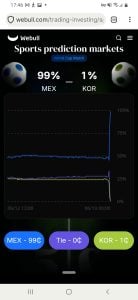
Desktop Experience
There are two ways to use Webull on desktop: via the web app or a dedicated app for Windows, macOS, or Ubuntu. The web app currently doesn’t offer prediction markets, whereas the desktop app is limited to hourly index and crypto-event contracts.
I installed and tested the Windows app and enjoyed the drag-and-drop interface. However, if you’re new to trading platforms, you’ll need some time to get used to how it works.
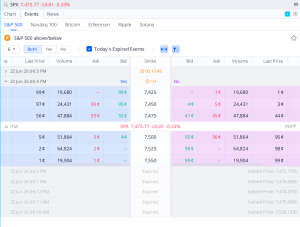
You can find the available market categories by clicking on “Events” and then picking the market you’re interested in. The screen displays active and expired contracts in collapsed tabs. The order page opens when you double-tap the contract you want, allowing you to enter the order limits and amounts.
Something that I truly enjoyed was the extreme customization possibilities, as I could move charts, widgets, watchlists, and trading panels around. There are also interesting tools, like the TurboTrader panel, which I’m sure will appeal to experienced traders.
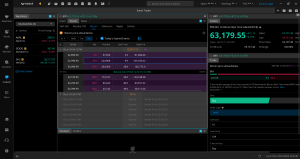
Still, the platform can quickly become overwhelming if you’re only interested in prediction markets. If that’s your case, I believe the most useful tools are the real-time order book, market depth data (available on a separate page), and customizable charts.
Mobile App
The Webull mobile app is available for iOS and Android, and you can access all available market categories by tapping “Events” on the main menu. From there, you can browse the markets (including Fed and sports, which are missing on the desktop app) and pick the markets you want to trade on.
The user experience on the mobile app is much simpler than on desktop, but true beginners can make it even easier to navigate by toggling the “Lite” button on their profile. This version makes the layout as barebones as possible and keeps the information and features to the necessary minimum. If you’re overwhelmed by complicated charts or too much data, this is the best option for you.

Placing orders is the same as on desktop, and the overall experience is very similar in the steps required to select and buy a contract position and to hold or sell it. I’d say that the mobile app offers 99% of the same features and functionalities as the desktop app, with the big addition of covering all market categories.
Still, if you’re registering with Webull for prediction markets only, I highly recommend sticking with the lite version, as it’s much easier to use.
Safety, Regulation and Trust
As mentioned, prediction markets on Webull operate within a regulated framework shared by Webull Futures LLC, a CFTC-registered Futures Commission Merchant, and KalshiEX LLC, a CFTC-regulated exchange.
Simply put, Webull provides the trading platform, while Kalshi is responsible for the market where the contracts are traded and settled.
Risk-wise, event contracts on prediction markets are fully funded upfront, which means you can’t lose more than the amount you invest in a position. You must also go through comprehensive identity verification processes before you can open an Events account, which adds an extra layer of protection, as Webull will take your financial information into account before approving you to trade on prediction markets.
Something I’d like to bring to your attention is that although Webull Financial LLC is a member of SIPC, prediction market balances aren’t protected by SIPC insurance, as they run through Webull Futures LLC. While this isn’t uncommon, it can be confusing as there is quite a bit of information about both companies at the website’s footer.
In general, as of October 2026, we didn’t find any major regulatory actions or enforcement cases involving Webull’s prediction market offerings. However, there has been considerable uproar between state legislators and Kalshi over certain market-category offerings, which could affect future offerings on Webull.
Geographic Restrictions
We last verified Webull’s availability in October 2026. Here’s where the platform is currently operating:
| Access level | States |
|---|---|
| Fully legal (Full access) | Accepts users from all 50 states |
| Limited access or active challenges | AZ, IL, MA, MD, MI, MT, NV, and OH * |
*These states have challenged Kalshi’s offering of sports-related event contracts, which may impact the offering on Webull.
Bonuses and Promotions on Webull
At the time of our review, Webull had four active promotions for new and existing users:
- First Deposit Bonus: Deposit $500 or more and receive $20 of fractional shares and one month of Webull Premium. This offer is available for new users only.
- Transfer Bonus: Get up to $175 when you transfer your brokerage account to Webull. You’ll get $100 reimbursement with your first transfer of at least $2,000 into your cash margin account, plus $75 with your first transfer of $5,000 or more into a self-directed Traditional, Roth, or Rollover IRA at Webull.
- Refer a Friend: Get $50 for each friend you refer to Webull and trade at least one event contract. Invite up to 3 friends and earn a maximum bonus of $150.
Webull Vs. Competitors: Closer Look



Who Is This Platform Best For
- Existing Webull users who want traditional investment products and prediction markets on the same platform.
- Traders interested in hourly event contracts on index and crypto markets.
- Users who prefer CFTC-regulated platforms over crypto-based systems.
- Kalshi users who want to expand their trading into stocks, ETFs, options, and futures.
Who Should Avoid It
- Users looking for a prediction markets-only platform with simple onboarding.
- Traders who want to fund their account with cryptocurrency.
- Casual users who don’t need advanced trading tools or analytics.
- Users who prefer using web or browser-based platforms only.
Best Alternatives to Webull
As you’ve probably noticed, Webull is primarily a trading and investment platform that also offers prediction markets. This makes it quite complex and perhaps not as suitable for beginners or for anyone looking only into event contracts. If that’s you, here are some of our best alternatives:
FanDuel Predicts
If you’re moving into prediction markets from sports betting platforms, then FanDuel Predicts might be the closest option available. With a strong focus on sports event contracts, this platform is the ideal first step between the two worlds.
Kalshi
Kalshi is the exchange behind prediction markets at Webull, which means you’ll have access to the same event contracts on both platforms, with the added bonus of saving the $0.01 fee you pay at Webull. If you’re interested in exploring market categories beyond economics and financials, Kalshi is a great option that still feels somewhat similar to Webull.
Crypto.com
For users who want to trade prediction markets with cryptocurrency, Crypto.com is the ideal platform. It also accepts all the other payment methods you’ll find at Webull, while giving you the flexibility of depositing and withdrawing with more than 350 coins.
Final Verdict
Webull is an excellent platform that brings prediction markets into a well-established traditional trading ecosystem. However, users drawn to prediction markets for their Yes/No simplicity might feel overwhelmed by the platform’s complexity and extensive list of trading tools and charts.
With this in mind, if you’re an avid trader who already invests in stock or ETFs and want to dip your toes into prediction markets, it might be the perfect combo.
Webull FAQ
Yes, Webull is legit and has been operating since 2017 as Webull Financials LLC, a multi-asset brokerage. In early 2025, it partnered with Kalshi to expand its product range with prediction markets. Webull Futures LLC is a CFTC-registered Futures Commission Merchant and operates in compliance with current prediction markets regulations.
Webull is safe and has a strict identity verification system. You’re mandated to have separate accounts for your cash or margin investing and prediction markets, which adds another layer of safety to your funds, as the first two types of accounts are protected under Securities Investor Protection Corporation (SIPC) insurance. Risk-wise, you can only lose the amount you spend on the contract positions you buy, keeping the rest of your balance intact.
No, Webull’s prediction markets operate as event contracts, which are a type of derivative regulated by the CFTC. This means that the prediction markets operate under federal financial market rules, rather than gambling regulations. When you trade an event contract on Webull, you’re buying or selling a financial contract tied to the outcome of a future event.
Webull doesn’t publicly list any minimum deposit limits on its platform. However, you don’t need to have a minimum balance to trade prediction market contracts. The minimum amount required in your balance is the price of the contracts you’re buying plus the associated fee ($0.02 per contract).
No. At the time of our review, Webull only accepts users based in the US. This might change in the future, particularly regarding the other financial and investment products the platform offers.
Yes, Webull is available via mobile app for iOS and Android. The platform also has a dedicated desktop app for Windows, MacOS, and Ubuntu, along with a web app. However, note that prediction markets are only available via the mobile app (all market categories) and the desktop app (hourly index and crypto markets).
Your funds from settled event contracts become available on the same day, and you can withdraw them via debit cards, ACH, or wire transfers. Processing times can range from near-instant for card withdrawals to up to 5 business days for wire transfers for bank accounts based outside of the US. You should also note that some withdrawal fees may apply (1.75% for debit cards, $25/$45 for wire transfers).
No, but the platform accepts paper trading. This feature allows you to trade with virtual funds to learn and test trading strategies. Event contracts are also available from $0.01 to $0.99 (plus a $0.02 fee per contract), so you can start learning about prediction markets without risking too much money.
